My budget brings together your monthly budget, the Atlas Score, the recommended scenarios and your retirement projections. It's the screen that answers "am I on track?".
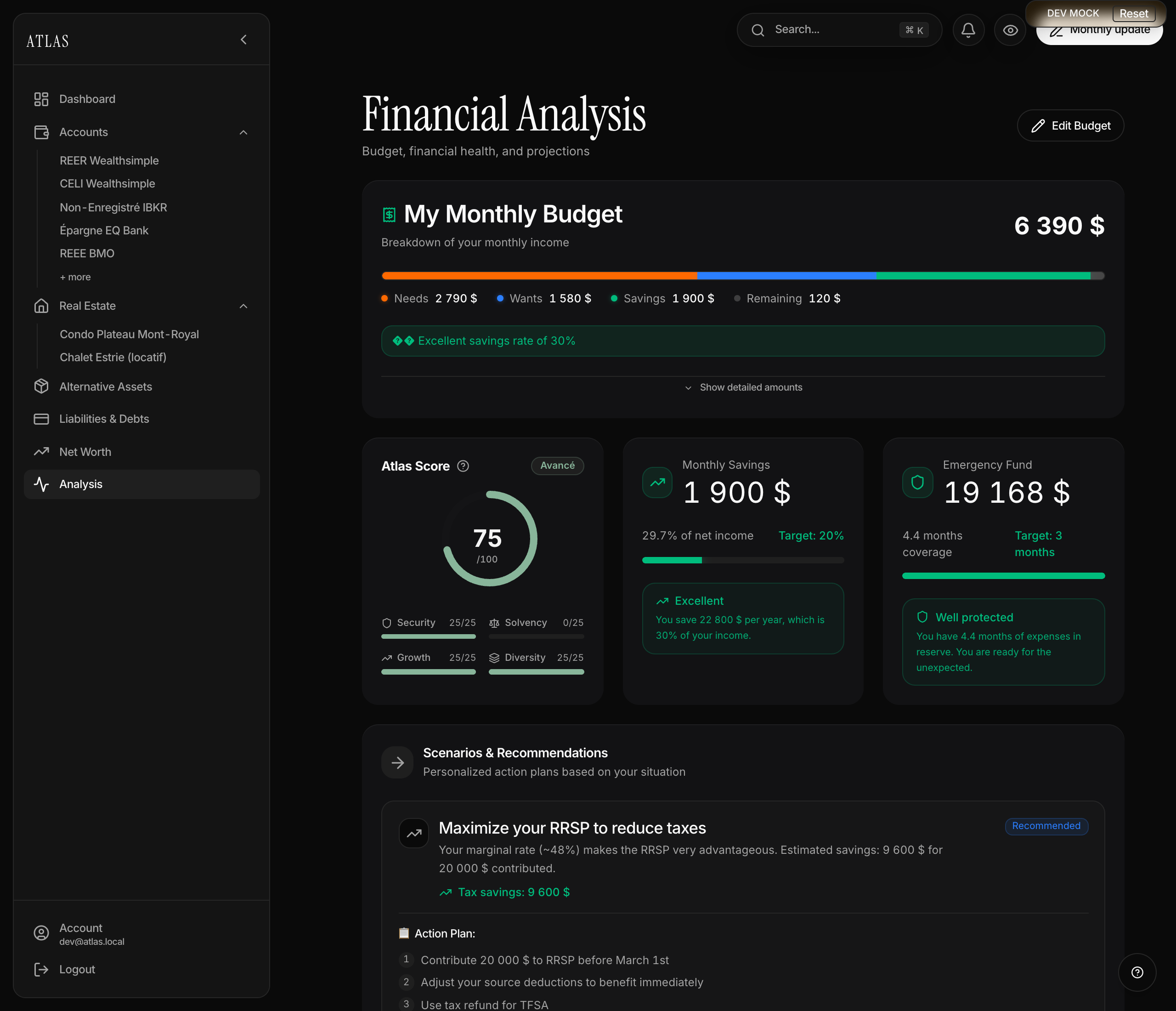
Entering your budget
On first open, a 4-step wizard — the Edit budget button, top right, brings you back to it later.
- Income — see below.
- Monthly fixed expenses — rent or mortgage, utilities, groceries, transport, insurance, subscriptions.
- Monthly variable expenses — restaurants, entertainment, shopping, other.
- Monthly savings — general savings, TFSA contributions, RRSP contributions.
Income, without the mental arithmetic
The first step asks how you are paid, not how much you make in a month. That's deliberate: getting paid every two weeks is the most common cadence in Quebec, and 26 pays a year do not divide into whole months. Doubling your pay — the reflex — understates income by 8%, and that gap then flows into your savings rate and your Atlas Score.
Two ways to answer:
- Per paycheque — the frequency, then the net amount per pay, meaning what lands in your account. Easiest way: open your banking app and read your last deposit. Atlas immediately shows the monthly income it derives, with the arithmetic:
$1,450 × 26 pays ÷ 12 months. - A monthly amount — if you're paid once a month, or you already know your total.
Switching between the two loses nothing: the amount is translated into the new unit. And your cadence is kept — coming back after a raise shows you your paycheque to correct, not a total to recompute.
Two optional fields round out the step:
- Other monthly income — child benefits, rental income, pension, CPP/QPP, a partner's pay. They count in the budget just like your paycheque, and therefore in your savings rate and Atlas Score.
- Annual gross salary — this is not part of the budget. It feeds retirement projections and your borrowing capacity. If your annualized net income exceeds it, Atlas flags it: one of the two figures needs a second look.
The Atlas Score
A score out of 100, the sum of 4 pillars worth 25 each:
- Security — your emergency fund. 25 points from 3 months of expenses covered, degrading to 0 below one month of cushion.
- Solvency — your debt ratio, liabilities over assets. 25 points under 30%, 22 up to 60%, 18 up to 80%, 10 beyond. A penalty applies if you carry "bad debt" — credit cards, personal loans — scaled to its weight against your income.
- Growth — your savings rate. 25 points from 20% of total monthly income — paycheque and other income, 22 at 15%, 18 at 10%, 10 at 5%.
- Diversification — how many asset families you combine among cash, real estate and markets. 25 points for all three, 20 for two, 15 for markets alone, 10 for cash or real estate alone.
Until your budget is filled in, the score runs in estimation mode: Security and Growth are read from your assets alone and capped, and a "zero debt" that no entry corroborates caps Solvency. This is deliberate: a high score is earned with real data, not empty fields. The card also lists the next actions and the points each can unlock — completing the budget is almost always the first one.
The total carries a label: Expert (85+), Advanced (70), Solid (50), Progressing (30), Beginner below.
Savings rate and emergency fund
Two indicators beside the score:
- Monthly savings — (savings + TFSA + RRSP) over total monthly income. Target: 20%.
- Emergency fund — liquid assets over monthly expenses. Target: 3 months, raised to 6 months if you carry a lot of debt.
Scenarios & recommendations
The section is generated from your profile: it isn't a what-if editor, but a reading of your most profitable levers, presented as action plans.
- Emergency fund to rebuild — Atlas quantifies the gap and proposes a monthly pace.
- RRSP or TFSA — from your income, age and current contributions, Atlas applies the federal tax brackets and those of your province to say which comes first in your case.
- Accelerated mortgage payoff — when your mortgage rate beats the expected return on saving.
Each scenario offers Dig in with Atlas, which opens the copilot on that precise subject, already knowing your figures.
The recommendations are rule-based, not statistical: stable, predictable, explainable. Their quality does depend on what you filled in under Set up my situation.
Retirement projections
With your date of birth and target retirement age, Atlas plots your wealth to retirement, from your current balance and your monthly saving. The projection applies a single annual return, adjustable in your profile, compounded monthly.
At the end of the curve, Atlas estimates your monthly retirement income with the 4% rule.